It’s been quite a while and a lot has happened in my life in the past few years.
But, with some force multipliers at my side, and determination to get MultiMC back to where it should be, this is a new start.
I want to make it the best possible version of itself, with no exceptions.
Generally, I have invested heavily into being able to ship large, numerous changes.
You may have noticed that MultiMC now has a fairly comprehensive visual theme system.
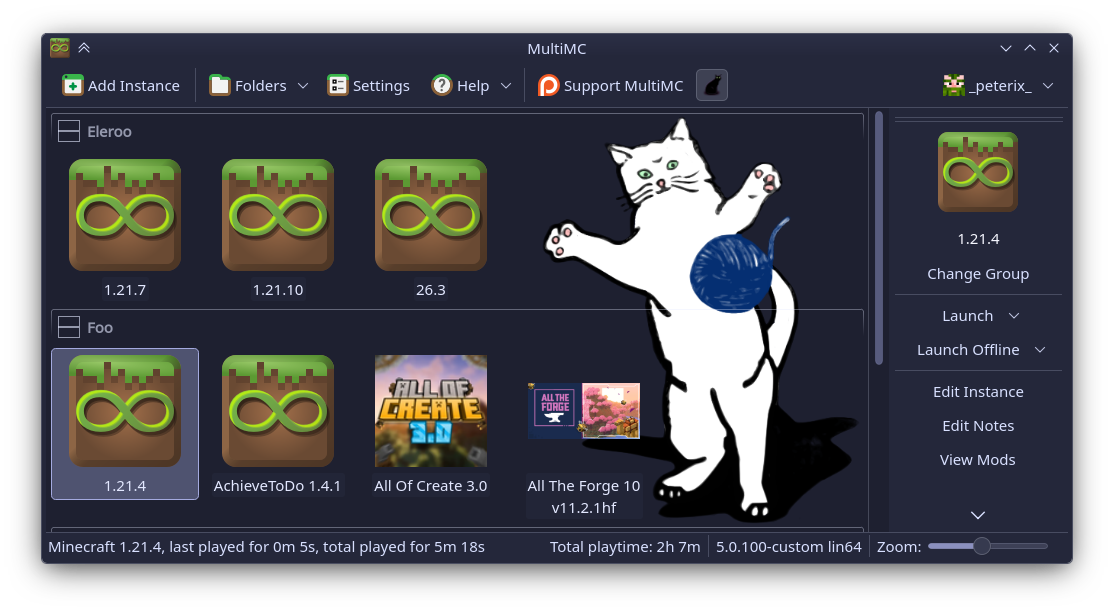
It looks better, it integrates better into all three operating systems, including titlebar colors, respecting system settings and generally being a much better experience.
There is also an editor for the themes, which gives you immediate response when you change the colors. Even when you work with the theme files outside MultiMC, it will dynamically reload your changes and show them as you work.
I plan to set up an online catalog of themes (and possibly more in the future), similar to what you would find on some Linux systems, accessible directly from the launcher.
On the first start (or after an update from the old version), you will be greeted by a choice from three different update tiers:
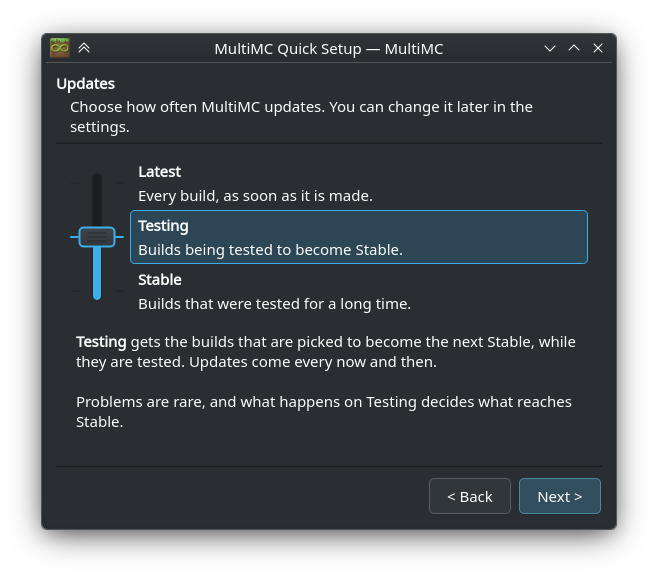
Latest
This is what we had up until now. It is every change made to the code, available almost immediately (usually minutes after the change is pushed). Because I am planning to speed up development massively, there may be some unstable changes there. And that’s why I’ve also added the other tiers.
Testing
This will have updates that aren’t completely ‘bleeding edge’. Testing is going to have things that are worth testing, and text changes in testing also get pushed to Crowdin for translation.
Stable
This is what you probably should be running from now on. It’s what gets you a stable, safe experience. Testing builds are promoted to Stable once we are sure they don’t cause trouble.
You can always change that in the settings afterwards.
Aside from that, you may also notice that you will be offered an upgrade to new variants of MultiMC builds. Until now, we have been building for some very old operating systems and computers. I do not want to drop this level of support, but I also want to bring MultiMC into the current decade.
So, I will be adding new variants of MultiMC:
ARM64 builds on all systems
This includes modern Apple devices.
Using newer versions of Qt 6 on all systems.
This should fix the rest of the display scaling issues, beyond the Qt 5.15 improvements. And it should also get us back to a good state on Linux systems, where Qt 5 is being deprecated.
Quite a bit of work went into making this easy, with the updater and a custom CI server at the center of it.
The immediate change is that on Windows, there is a variant that drops XP and Vista support, and has better handling of display scaling. We’ve had that in the background, but now it is offered automatically.
It is now possible to translate the various dialog windows and parts of the UI that come from the UI toolkit we use.
All of this is very doable.
With so many Java versions we need to deal with, it’s to the point where this is a dealbreaker.
MultiMC’s current Java handling was fine when all we had was Java 7 and 8.
This is the top priority.
For linux compatibility, display scaling on all systems and better visual themes on Windows.
Installing individual mods needs to be added. So is updating modpacks, regardless of platform where they came from.
More mod platforms need to be added. Especially CurseForge.
None of these are new ideas, and have been implemented elsewhere. So, you know what to expect.
Similar to https://store.kde.org/browse/
Some work has been done already, but it’s nowhere near enough.
I have some plans that might change Linux packaging altogether. We’ll see where that goes, but the idea is sound.
© 2013-2026 MultiMC Contributors